CENTURION Mini Product Catalogue

Showing posts with label nova remotes. Show all posts

Monday, 5 December 2016

2016 in Review

2016: what a year. What. A. Year.

Last month, the eyes of the world were firmly fixed on the U.S. presidential elections as former first lady Hillary Clinton fought tooth and nail to become the nation’s first female president, but was ultimately defeated – in what can only be described as a bizarre twist worthy of an M. Night Shamalayan film – by real estate mogul turned controversial politician Donald Trump.

Critics of the “the Donald” reeled with shock and disbelief, while his many proponents rallied in support of the outcome, which has once again come under close scrutiny.

2016 will also be remembered as the year that we lost a number of greats from the worlds of screen and stage, including genre-defying transcendental musician David Bowie and British actor Alan Rickman, perhaps most famous for portraying the character of Severus Snape in the popular Harry Potter series of films. If, like me, you enjoy the Brits' particular brand of caustic and unsentimental humour, you will be particularly saddened by the loss of Andrew Sachs, who played Manual alongside John Cleese in the absolutely brilliant but sadly short-lived Fawlty Towers.
The late, great David Bowie By Photographer: Photobra|Adam BielawskiDerivative work: Y2kcrazyjoker4 - David-Bowie_Chicago_2002-08-08_photoby_Adam-Bielawski.jpg, CC BY-SA 3.0, Link


But there was also good news aplenty to be had in the Year of the Monkey. Most notably, for Team CENTURION, at least, the high-profile acquisition of the company by global access automation powerhouse FAAC S.pa, whose far-reaching influence and significant resources promise to be beneficial for employees and clients alike. 

The NOVA remote has been updated with a stylish carbon look
From a product perspective, our focus in 2016 was on improving and enhancing our existing offering, especially from the point of view of making life easier for CENTURION installers by streamlining the installation process. The highly successful 5x Better campaign saw us take to the road to showcase the myriad improvements made to, among other products, the NOVA remote control and the RDO roll-up garage door motor.

Finally, 2016 saw CENTURION celebrate 30 years of providing peace of mind through industry-leading access automation solutions. From the humblest of beginnings, the company has grown to a global empire with 10 fully-fledged branches (including two beyond our borders), a vast global footprint spanning more than 70 countries, and a staff complement of just shy of 400 dedicated, talented and exceptionally passionate employees. Three decades have passed since CENTURION MD Pat Dickens toiled tirelessly in a modest wooden shed determined to bring his vision to life, and the fruits of his past and present labours could not be sweeter; the shadow cast by his enterprise so immense that competitors have no choice but to reside in it.

It is your continued loyalty and support that have enabled us to not only survive, but thrive, for the past thirty years, and for that we thank you from the bottom of our hearts. Here’s to the next 30 years and beyond.

Have a safe and secure festive season. 

Wednesday, 25 April 2012

Adding a CENTURION Remote To Your D-Series Gate Motor


in·tu·i·tive \in-'tü-ə-tiv, -'tyü-\ adj (ca. 1645)
1 a : known or perceived by intuition : directly apprehended  b : knowable by intuition ‹~ truths› c : based on or agreeing with intuition ‹~ responses› ‹makes ~ sense› d : readily learned or understood ‹software with an ~ interface›
2 : knowing or perceiving by intuition
3 : possessing or given to intuition or insight ‹an ~ mind›
— in·tu·i·tive·ly adv
— in·tu·i·tive·ness n

 This is the word that best describes the CENTURION D-Series interface.  Intuitive.  When you get right down to it, there’s really very little thinking to be done on the part of the user – the controller does it all for you!  From setting the limits to learning additional remote controls, setting up your gate motor using this advanced platform is like having a friendly robot holding your hand and guiding you through each and every step.
But, just in case you don’t know just how easy it is, this tutorial will guide you through adding a CENTURION code-hopping remote control to a D-Series gate motor’s onboard receiver.

1.        Enter Programming Mode by pressing and holding the oblong (centre) button for approximately two seconds.  The words “Setting Limits” will appear on the LCD display. 


2.       Press the up arrow once – the words “Remote Controls (Tx)” will appear on the screen.  Press and release the oblong button (this button serves as an “enter” or confirmation button of sorts) to enter the Remote Controls menu.


3.       “Add Remote” will now appear on the screen.  Press and release the oblong button.


4.       The controller will now ask you what you want to use the remote for, for e.g. triggering the gate, opening for pedestrians, activating the Holiday Lockout feature, etc.  Say, for e.g. that you wish to press the remote to open, stop and close the gate; you will then select “Trigger Gate” as the primary function.  Once again you will use the oblong button to confirm your selection.

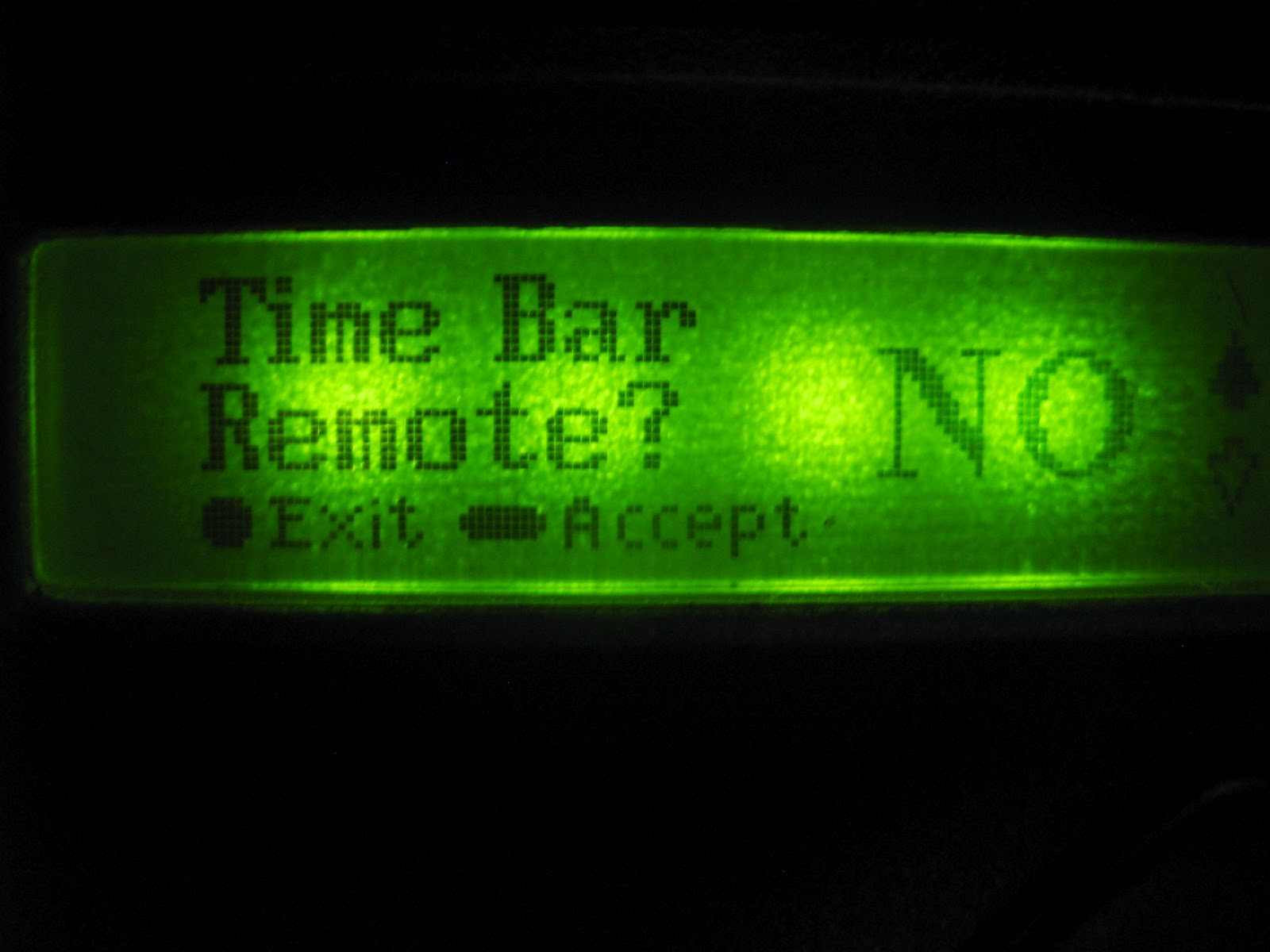
5.       The next screen will display “Time-bar remote:  No”.  If you don’t want to enable time-barring for that particular remote, simply press the oblong button to confirm your selection as being “No”.  If you want to time-bar the remote, press the up arrow so that the screen displays “Yes”, and confirm with the oblong button.


6.       The unit will now ask you to press your remote button.


7.       Press and release the desired remote button(s).


8.       A unique ID will appear on the screen, indicating that the button has been successfully learned.

9.       Now press the round button twice to exit Programming Mode.

10.   Hey presto!  Your CENTURION remote is ready to be used!

Thursday, 23 February 2012

Remote Controls: A Genesis

There is a popular (though probably misquoted) saying that declares that nature – and, by extension, humanity - should either “adapt or die”.  Although this axiom was probably not intended to be taken literally, it does hold a certain amount of truth when it comes to security.  As technology has advanced to become more sophisticated, more futuristic, so also has crime.  It’s almost as if criminals are using the very technology that we developed to keep them at bay, against us.  There’s been a definite evolutionary trend in crime. 

The good news is that we’re still ahead.  This blog post will look at how that staple of access automation – the remote control – has evolved to combat crime and how we are still on the winning side.

Dipswitch Days

Back when the world was young, dipswitch technology ruled with an iron fist.  Dipswitch-based devices were easy to use and configure and could be employed for a plethora of applications.  All that the user needed to do in order to synchronise a remote with a receiver was to set the little plastic switches in the same configuration on both devices and – hey presto! – the remote was programmed.

Now, it doesn’t take a great stretch of the imagination to see why this system might be considered vulnerable.  With the ease of setup and use came glaring security flaws which could not be ignored, and so fixed code remotes saw the light.

Fixed Codes:  The Next Generation

The advent of fixed code remotes dramatically increased the security of remote control systems.  There were no visible switches that a mildly determined criminal might copy - all the coding took place safely within the airwaves.  For a while, it truly seemed that this was a system that crooks could not circumvent.  Criminals being criminals, they eventually devised a means of “code grabbing” the transmissions and creating cloned remotes, thereby allowing them easy access into properties.

But once again, goodness prevailed and – in true comic book superhero style - a revolutionary new technology dealt the hoodlums of the world a crippling blow.

Rolling Code Technology:  The Final Frontier

Many of you reading this might be using CENTURION NOVA remotes and know them as the robust little blue and grey transmitters.  What you may not know is that NOVA employs an ultra-secure encryption technology known as rolling code, or Keeloq™ encryption.  This means that the code transmitted by the remote is always different to the previous one, with a possible 16 billion combinations.  In addition to this, it also passes through a sophisticated encryption engine which makes code-grabbing impossible.

So, dear citizens, rest easy knowing that – while we may not wear masks and capes like traditional superheroes – we’re still looking out for you.    

Monday, 30 January 2012

Give your remote control an extra button...or two!

On this blog alone you’ve probably come across the word “security” a couple of dozen times – and there’s a very good reason for that.  In the early 1940s, the influential psychology professor Abraham Maslow came up with the now-famous Hierarchy of Needs, which depicts in pyramid-form the basic human needs in order of importance (with the bottom of the pyramid being the most important).  In this hierarchy, Safety – which includes security of body, resources, family and the like – is ranked as being one of the most important human needs, second only to physiological needs such as eating and breathing.  That’s how paramount security is.

The aim of this blog is to help you be more security-conscious by arming you with useful tools, tips and guidelines and by providing new and innovative ways of assuring your own safety and the safety of your loved ones and possessions.  In today’s post, we will be looking at a useful feature inherent in some of our remote receivers, the so-called “shift” function.

What it is

 The shift-button functionality allows the user to artificially increase the number of buttons on a multi-button remote control by using a two-button combination.  In other words, activating a certain gate motor function will now involve pressing two buttons instead of one.

The Benefits

Although the CENTURION NOVA range of transmitters uses secure rolling code technology which makes code-grabbing impossible, making use of combinations rather than single-button activations is bound to up the security ante even further.  In addition, the shift system allows a three button transmitter to gain an extra function and operate four functions and likewise a four button transmitter gains two extra buttons and can operate six functions. 

Another benefit of using the shift button system is that it requires both hands to operate the two button combination.  How many times have you not activated the Holiday Lockout function by accident and was left scratching your head as to why you suddenly can’t open our gate?  With the shift button system, this is far less likely to happen as it now takes two hands to enable the Lockout.

How to do it

With your receiver in Learn Mode, simply press and hold the shift button, and then press one of the other buttons to create a new button.  This combination will then be pressed whenever the associated function needs to be activated.

Sunday, 4 December 2011

Do your remote controls provide you with the security that they should?

Today, we'll be looking at a rather contentious issue that's been garnering a lot of media attention lately, so-called "signal jamming" by criminals.

A recent article that appeared in an Mpumalanga newspaper and various emails that have been doing the rounds have been causing quite a stir.

The article detailed how some remote controls may interfere with vehicle remote controls, which arm the car’s alarm and opens and closes the central locking systems. It is claimed that these remotes are responsible for jamming the vehicle’s remote control frequencies, thereby making it easy for thieves to help themselves to the contents of a car once an unsuspecting driver walks away. The car owner presses his remote control to lock his car, assuming his car is locked and the alarm is armed. Only to return to find all of his possessions left safely in his ‘locked’ car missing.

There has also been a fair amount of finger-pointing at particular brands of remote controls as being the culprits. There is also a huge amount of misinformation and confusion surrounding this issue, so CENTURION decided to clarify the misconceptions and help you understand how these incidents may have occurred, and what to do to ensure that it never happens to you.

Let’s start by delving into the technology that resides inside high-security remote controls. Any modern high-security remote control should have rolling-code technology. Essentially, this means that every time that you press the button on your remote control it changes it’s code (or identity) and the receiver in the car, gate motor, etc. that it usually talks to, correspondingly rolls its code to stay in synchronisation.
This means that your rolling-code remote control for your car or access automation system cannot be copied or cloned – providing you with great peace of mind.

However, the vast majority of vehicle manufacturers, and other manufacturers of remote controls such as gate and garage automation, produce remote controls that operate on a frequency of 433MHz issued by ICASA, the regulator for the South African communications sector. This results in this frequency being very busy with many, many remote controls utilising this airspace.

Typically what can happen is if two remote controls operating on the same frequency are activated simultaneously and within range of each other, the signals that they are transmitting can interfere with one another. The result could mean that the receiver doesn’t recognise the ‘strange’ interfered-with signal from its know transmitter remote control. What happens? Nothing – the receiver simply doesn’t react. This is fine if you’re trying to open your gate – your home is still secure, and you just press your remote again and your gate opens.

Now you can imagine that in the instance of locking your car you would want to know that your car really is locked when you press your remote control. If a car owner in your vicinity presses their remote at the exact same instant as you, or for some reason is holding their remote button down,
for example to automatically open all of their car windows before getting in to let all of the hot air out (nice feature!), then this will certainly interfere with your car’s remote control signal.

This doesn’t have to be another vehicle remote control; it could be any type of remote control operating on the same 433MHz frequency that can cause interference.

This is why most cars will give a visual and/or audible verification on receiving a remote control signal. Typically the indicators will flash, or the car will beep, once for locked and twice for unlocked.

The bottom line is that any remote control from any manufacturer is vulnerable to being jammed, or having its signal interfered with. Thieves may try to take advantage of this by flooding an area with remote control signals in the hope that you might simply walk away from your car without actually checking that it did lock and arm.

So please safeguard yourself and look for the telltale flashing indicators, or listen for the confirmation beep, which will reassure you that your car is locked and your goods are safe.

For further information or advice concerning remote control security please feel free to call any CENTURION branch or our customer service line on 0860 236 887.